题解
vlhub给了我们这样的网页
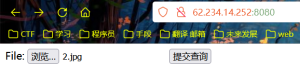
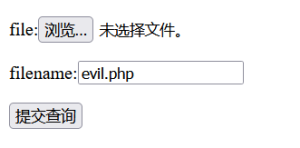
测试发现只不能提交.php文件,我们将一句话木马<?php phpinfo(); ?>写进1.txt,重命名为1.jpg,然后上传,这个过程burp抓包,将filename从"1.jpg"改为"1.jpg "并forward,上传成功~服务器存着一个叫"1.jpg "的非图片文件.
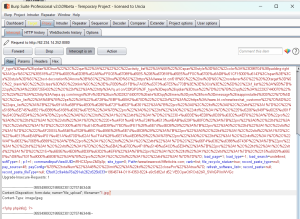
在浏览器输入62.234.14.252:8080/uploadfiles/1.jpgaa.php并抓包,
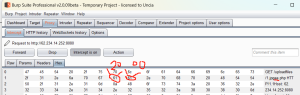
然后Forward,漏洞利用成功:

我的服务器是nginx1.20,比较新,上述漏洞未能成功显示phpinfo();显示如下:

踩坑点及深入挖掘原理
-
成功上传1.jpg[0x20]后,访问http://62.234.14.252:8080/uploadfiles/1.jpg显示如下

因为服务器上存的是1.jpg[0x20],而浏览器输入62.234.14.252:8080/uploadfiles/1.jpg[0x20]实际访问的还是62.234.14.252:8080/uploadfiles/1.jpg (对,浏览器会过滤忽略掉url开头结尾的空格),所以404了。
-
假设我们上传的就是1.jpg,文件名不带空格,然后我们访问62.234.14.252:8080/uploadfiles/1.jpg,这个访问过程无法被FoxyProxy和burp抓包,可能是因为纯图片不是报文不在其业务范围的缘故。
解决如何即访问1.jpg[0x20]又能让burp抓到包?:
访问http://62.234.14.252:8080/uploadfiles/1.jpgaa.php,违背了纯图片就能被抓包了。然后用burp在底层将aa修改为
[0x20][0x00]就能访问1.jpg[0x20]了 -
官方教程教收尾阶段访问
http://your-ip:8080/uploadfiles/1.jpg[0x20][0x00].php,我傻乎乎的尝试在浏览器输入带[]的、不带[]的、[0x20]改写而成空格的、[0x00]改写不成空,都显示404了。后来才知道要去burp去修改报文的十六进制底层,即访问http://62.234.14.252:8080/uploadfiles/1.jpgaa.php,其中aa是可以留的占位符,a在底层对应ascii的十六进制61,将[61][61]改成[20][00],其中20是空格,00是空的ascii。 -
这里应该是用到了0x00截断原理了,具体原理是 系统在对文件名的读取时,如果遇到0x00,就会认为读取已结束。这个常用在对文件类型名的绕过上。还不止这个原理。
-
当Nginx得到一个用户请求时,首先对url进行解析,进行正则匹配,如果匹配到以.php后缀结尾的文件名(即http://62.234.14.252:8080/uploadfiles/1.jpg \0.php),会将请求的PHP文件交给PHP-CGI去解析。
其中处理模块如下:location ~ \.php$ { root html; include fastcgi_params; fastcgi_pass IP:9000; fastcgi_index index.php; fastcgi_param SCRIPT_FILENAME /var/www/html$fastcgi_script_name; fastcgi_param DOCUMENT_ROOT /var/www/html; }
以.php结尾的文件都会交给该模块处理,其中fastcgi_pass就是Nginx与PHP-FPM之间的媒介,通过ip+port的方式将请求转发给PHP解释器。但是我们有代码的文件它叫’1.jpg ‘啊,不叫'1.php'不叫'1.jpg php'不叫'1.jpgphp',所以我们利用0x00的阶段原理,用0x00将'1.jpg '和.php分隔开。http://62.234.14.252:8080/uploadfiles/1.jpg \0.php通过.php进入这个Location块;但进入后,Nginx却因0x00隔断而错误地认为请求的文件是
1.gif[0x20],就将'1.gif '交付PHP-CGI去解析(就设置其为SCRIPT_FILENAME







top-memorial-515
Памятники на заказ <a href=https://top-memorial.ru/>https://top-memorial.ru</a> широкий выбор форм и материалов, профессиональное изготовление и монтаж. Индивидуальный подход, гарантия качества и доступные цены.
Anya135ml
Hello pals!
I came across a 135 fantastic resource that I think you should take a look at.
This platform is packed with a lot of useful information that you might find insightful.
It has everything you could possibly need, so be sure to give it a visit!
<a href=https://reviveus2016.com/gambling-tips/balancing-your-personal-and-professional-life-with-gambling-addiction/>https://reviveus2016.com/gambling-tips/balancing-your-personal-and-professional-life-with-gambling-addiction/</a>
Furthermore do not forget, everyone, that you at all times may within this piece discover answers for your the very tangled queries. The authors attempted — present the complete content via an extremely easy-to-grasp way.
Gichardrap
Picture this: you’re cooking dinner and the recipe calls for grams, but your scale only shows ounces. Later, you’re helping your child with homework and suddenly need to convert meters per second into kilometers per hour. The next morning, you’re preparing a presentation and realize the client wants it in PDF format. Three different situations, three different problems – and usually, three different apps.
That’s the hassle OneConverter eliminates. It’s an all-in-one online tool designed for people who want life to be simpler, faster, and smarter. No downloads, no subscriptions, no headaches – just answers, right when you need them.
Unit Conversions Made Effortless
Most conversion tools handle only the basics. OneConverter goes further – much further. With more than 50,000 unit converters, it can handle everyday situations, advanced academic work, and professional challenges without breaking a sweat.
Everyday Basics: length, weight, speed, temperature, time, area, volume, energy.
Engineering & Physics: torque, angular velocity, density, acceleration, moment of inertia.
Heat & Thermodynamics: thermal conductivity, thermal resistance, entropy, enthalpy.
Radiology: absorbed dose, equivalent dose, radiation exposure.
Fluids: viscosity, flow rate, pressure, surface tension.
Electricity & Magnetism: voltage, current, resistance, capacitance, inductance, flux.
Chemistry: molarity, concentration, molecular weight.
Astronomy: light years, parsecs, astronomical units.
Everyday Extras: cooking measures, shoe and clothing sizes, fuel efficiency.
From the classroom to the lab, from the office to your kitchen – OneConverter has a solution ready.
<a href=https://deskrush.com/how-to-convert-millimeters-to-inches/>OneConverter.com</a>
Fobertenete
Students, professionals, and hobbyists alike rely on OneConverter.com as a trusted resource. High school students use it to complete homework questions, ensuring they understand how to convert between units of volume or temperature. College researchers appreciate its scientific precision when dealing with complex conversions in physics or engineering. Business professionals often need quick currency or time zone calculations to plan international meetings; this site delivers those results instantly. DIY enthusiasts measure materials for home improvement projects by converting square feet to square meters or gallons to liters. Photographers evaluate storage needs by converting between megabytes and gigabytes. Fitness trainers track distances and energy expenditure by switching between miles and kilometers or calories and kilojoules. With OneConverter, there’s no need to memorize dozens of conversion factors — just input your number, choose your units, and the answer appears. The clear layout and straightforward instructions help users learn as they go, making the site both a tool and a teaching aid. Regardless of your field or expertise level, OneConverter.com provides the conversions you need, right when you need them.
<a href=https://emiratesinside.net/how-to-convert-pounds-to-kilograms/>OneConverter</a>
OLaneBup
At WebPtoPNGHero.com, converting WebP images into PNG format couldn’t be simpler. The interface features a drag-and-drop area where images load instantly, and conversion begins on secure cloud servers. A progress meter keeps you informed, and once each file finishes, PNG versions appear as clickable download links. If you have many images to process, batch mode handles multiple files at the same time, saving precious minutes. The tool runs entirely in your web browser, making it compatible with Windows, macOS, Linux, Android, and iOS alike. No need to install any applications or plugins—just open the site and start converting. All uploads vanish shortly after processing, ensuring privacy and security. Whether you’re optimizing visuals for an e-commerce store, preparing photos for email attachments, or simply sharing snapshots online, WebPtoPNGHero.com delivers reliable, high-fidelity results. The service remains free and ad-free, with no registration required. Convert your WebP images to universally supported PNG files quickly and without hassle.
<a href=https://list.ly/jpg-1/lists>WebPtoPNGHero</a>
JohnnyGah
<a href=https://tgbusters.ru/>накрутка подписчиков в телеграм дешево</a>
Gustavoben
<a href=https://tgboostup.ru/>накрутить подписчиков в тг</a>
Jamesbon
<a href=https://tg1000.ru/>накрутка подписчиков тг задания</a>
RobertWinue
Интернет-маркетинг <a href=https://yandex-reklama2.ru/>https://yandex-reklama2.ru</a> для компаний и специалистов: SEO, SMM, контекстная реклама и email. Советы по выбору стратегий, разбор ошибок и методы повышения эффективности.
RobertWinue
Интернет-маркетинг <a href=https://yandex-reklama2.ru/>https://yandex-reklama2.ru</a> для компаний и специалистов: SEO, SMM, контекстная реклама и email. Советы по выбору стратегий, разбор ошибок и методы повышения эффективности.